
Running a business today is exciting, but it can also feel overwhelming. Between answering enquiries, following up with leads, booking appointments, sending reminders, updating spreadsheets, managing customer information, checking emails, and keeping your team organised, the daily workload can pile up very quickly.
For many business owners, the real problem is not a lack of opportunities. The problem is that too many opportunities are missed because there is no proper system in place. A potential customer fills out a form, sends a message, calls once, or asks for a quote, but if no one follows up quickly, that lead can easily go cold.
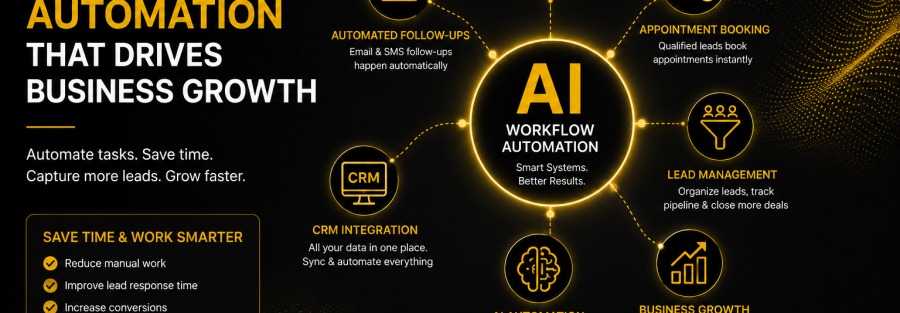
This is where AI workflow automation becomes powerful. Instead of relying only on manual work, businesses can use automation, CRM systems, AI tools, and smart follow-up workflows to handle repetitive tasks faster and more consistently. This means less time spent chasing admin and more time spent serving customers, closing deals, and growing the business.
At 2in1 Digital, we help businesses build smarter daily workflows using AI automation, CRM as a Service, lead capture systems, email and SMS automation, and virtual assistant support. The goal is simple: help business owners save time, respond faster, and manage leads more effectively without feeling buried in manual tasks.
The best part is that automation does not have to replace the human side of business. When done properly, it supports your team. It handles the repetitive work in the background so your business can deliver a faster, more organised, and more professional customer experience.
Google also recommends creating helpful, people-first content that benefits readers rather than content made only to manipulate rankings, which is why this article focuses on practical business value, not just keywords.
What Is AI Workflow Automation?
AI workflow automation is the process of using technology to complete repetitive tasks, organise information, and trigger actions automatically. It combines automation tools, artificial intelligence, CRM systems, and communication platforms to help your business run more smoothly.
For example, when someone fills out a form on your website, an automated workflow can instantly add that person into your CRM, send them a welcome message, notify your team, assign a follow-up task, and start an email or SMS sequence. Without automation, all of those steps would need to be done manually.
AI makes this even stronger because it can help sort, qualify, summarise, and respond to information faster. Instead of your team manually reading through every enquiry, AI can help identify which leads are more urgent, what service they are interested in, and what next step should happen.
A simple example would be a service-based business receiving enquiries through its website. With automation, every enquiry can be captured, tagged, followed up, and tracked inside one system. The business owner no longer needs to wonder, “Did we reply to that lead?” because the workflow has already started.
Why Manual Workflows Slow Businesses Down
Many businesses still rely on a mix of emails, spreadsheets, sticky notes, phone reminders, and memory to manage leads and customers. This might work when the business is small, but it becomes risky as enquiries increase.
Manual workflows often create delays. A lead might come in while the business owner is busy on a job, in a meeting, or handling another customer. By the time they respond, the prospect may have already contacted a competitor.
Manual systems also make it easier for details to be missed. One person might update a spreadsheet, another person might reply by email, and someone else might forget to follow up. Without one central system, the customer journey becomes inconsistent.
For example, imagine a business receiving 20 enquiries in a week. If each enquiry needs manual data entry, manual follow-up, manual reminders, and manual appointment scheduling, that quickly becomes hours of admin. AI workflow automation reduces that pressure by making sure every lead follows a clear process.
How CRM Automation Helps Manage Leads Better
A CRM, or Customer Relationship Management system, helps businesses organise leads, customers, conversations, tasks, appointments, and sales opportunities in one place. When connected with automation, it becomes one of the most valuable systems in the business.
Instead of leads being scattered across inboxes, social media messages, website forms, phone calls, and spreadsheets, a CRM keeps everything centralised. This makes it easier to see who contacted you, what they need, what stage they are at, and what follow-up is required.
CRM automation can also trigger actions based on lead behaviour. For example, if a prospect fills out a quote form, the CRM can automatically move them into a “New Lead” pipeline, send a confirmation message, create a task for your team, and schedule a follow-up reminder.
This is where CRM as a Service becomes helpful. Many business owners know they need a CRM, but they do not have the time to set it up, manage it, or create workflows. With CRM as a Service, 2in1 Digital can help build and manage the system so the business can use it without getting stuck in the technical setup.
Google’s SEO Starter Guide also highlights that useful, compelling content can influence a website’s presence in search results, which supports the importance of clearly explaining services like CRM automation in a way business owners can understand.
How AI Automation Improves Follow-Ups
Following up is one of the most important parts of converting leads, but it is also one of the easiest things to forget. Many prospects do not buy after the first contact. They need reminders, answers, reassurance, or a simple nudge to take the next step.
AI automation helps businesses follow up faster and more consistently. When a lead comes in, the system can automatically send a personalised email, SMS, or chatbot response. It can also remind the team when a manual call or personal message is needed.
This is especially useful for service-based businesses. A customer might enquire about website development, SEO, AI automation, CRM setup, or VA support. Instead of sending the same manual response every time, automation can send a relevant message based on the service they selected.
For example, if someone enquires about AI automation, they can receive a message explaining how the process works, what the next step is, and how to book a consultation. The business looks responsive, organised, and professional, even if the owner is busy at the time.
How Lead Generation Automation Captures More Opportunities
Lead generation automation helps businesses capture enquiries from different sources and move them into one organised system. These sources can include website forms, landing pages, Facebook ads, Google ads, email campaigns, phone calls, chat widgets, and social media messages.
Without automation, leads can easily slip through the cracks. Someone might fill out a form, but the email notification gets buried. Someone might send a Facebook message, but no one checks it until the next day. Someone might ask for a quote, but no follow-up is scheduled.
With automation, every lead can be captured instantly. The system can record the lead details, tag the source, assign the contact to a pipeline, and start the correct follow-up sequence. This gives the business a better chance of converting the enquiry.
For example, a local service business running ads can connect its lead form directly to a CRM. As soon as a prospect submits their details, the system can send a thank-you message, notify the business owner, and invite the prospect to book a call. That is much more effective than waiting hours or days to respond.
How AI and Virtual Assistants Work Together
One of the biggest misconceptions about AI automation is that it removes the need for people. In reality, the best systems combine technology with human support.
AI can handle repetitive, rule-based, and information-heavy tasks. A virtual assistant can handle the tasks that still need judgement, communication, checking, organising, and personal attention. Together, they create a stronger business support system.
For example, AI can help sort enquiries, send automated messages, and update the CRM. A VA can then review the pipeline, call leads, respond to complex questions, book appointments, send reports, and make sure nothing is missed.
This is the “2in1” approach: combining smart technology with reliable support. Businesses do not just need software. They need systems, people, and processes working together.
Common Daily Tasks You Can Automate
Many businesses are surprised by how many daily tasks can be automated. The goal is not to automate everything, but to remove the repetitive work that slows the business down.
Common tasks include capturing website enquiries, sending welcome emails, following up with leads, booking appointments, sending reminders, updating CRM records, assigning tasks, notifying team members, sending review requests, and generating reports.
For example, after a customer completes a service, an automated workflow can send a thank-you message and ask for a Google review. This simple process can help improve reputation without requiring the business owner to remember to ask every customer manually.
Another example is appointment reminders. Instead of manually texting every customer, automation can send reminders before the appointment. This can reduce no-shows and improve the customer experience.
What Businesses Benefit Most from AI Workflow Automation?
AI workflow automation is useful for many types of businesses, especially those that receive regular enquiries, manage appointments, or rely on follow-ups to convert prospects.
Service-based businesses benefit heavily because speed matters. If a lead asks for a quote, books a consultation, or requests information, a fast response can make the difference between winning or losing the customer.
Trades, professional services, real estate agencies, finance businesses, marketing agencies, hospitality businesses, consultants, coaches, and local service providers can all use automation to save time and improve lead management.
For example, a finance broker could use automation to capture loan enquiries, send document checklists, remind clients about missing information, and notify the team when a lead is ready for review. This creates a smoother process for both the business and the customer.
Why Businesses Should Start Simple
One mistake businesses make is trying to automate everything at once. This can make the process feel complicated and overwhelming. The smarter approach is to start with one or two high-impact workflows.
The best starting point is usually lead capture and follow-up. If your business can capture every enquiry, respond quickly, and keep leads organised, you already improve one of the most important parts of the customer journey.
From there, you can add more workflows such as appointment reminders, sales pipeline updates, customer onboarding, review requests, reporting, and VA task management.
For example, a business might first automate website enquiries. Once that works well, the next stage could be automating email and SMS follow-ups. After that, the business can connect VA support to help manage the pipeline and respond to priority leads.
How 2in1 Digital Helps Businesses Automate Daily Workflow
At 2in1 Digital, we help businesses create practical automation systems that match how they actually work. We focus on making daily operations easier, not more complicated.
Our services can include CRM setup, AI automation, lead generation systems, email and SMS workflows, appointment booking automation, lead pipeline management, reporting dashboards, and virtual assistant support.
We work with businesses that want to save time, improve response speed, and stop missing opportunities. Whether you are starting from scratch or already have tools in place, we can help create a clearer system.
The aim is to build a workflow that supports your business every day. That means fewer missed leads, less repetitive admin, better organisation, and a more professional customer experience.
Final Thoughts
AI workflow automation is no longer just for large companies. Small and medium businesses can now use powerful systems to capture leads, automate follow-ups, manage CRM tasks, and improve daily operations.
The businesses that benefit most are the ones that use automation with a clear purpose. It is not about adding more tools for the sake of it. It is about creating a smarter way to work.
By combining AI automation, CRM systems, lead generation workflows, and VA support, your business can respond faster, stay organised, and focus more energy on growth.
That is why 2in1 Digital exists, to help businesses bring two essential parts of growth together: smart technology and reliable human support.
Ready to automate your daily workflow?
Book a free consultation with 2in1 Digital and discover how AI automation, CRM as a Service, and VA support can help your business save time, capture more leads, and grow smarter.
FAQs
What is AI workflow automation?
AI workflow automation uses artificial intelligence and automation tools to handle repetitive business tasks such as lead capture, follow-ups, CRM updates, appointment reminders, and customer communication.
Do small businesses need CRM automation?
Yes. A CRM helps small businesses organise leads, track conversations, manage follow-ups, and reduce missed opportunities. CRM automation makes the process faster and easier to manage.
Can AI automation replace my staff?
Not necessarily. AI automation is best used to support your team by handling repetitive tasks. Human support is still important for customer service, decision-making, and personal communication.
What is CRM as a Service?
CRM as a Service means your CRM system is set up, managed, and supported for you. This helps businesses use CRM technology without needing to handle all the technical work themselves.
What tasks should I automate first?
The best tasks to automate first are lead capture, enquiry responses, follow-up messages, appointment reminders, and CRM updates because these directly affect sales opportunities and customer experience.